
Every improvement, in one place. AI doing the heavy lifting.
Beyond Delta is the single home for continuous improvement. Ideas, projects, process maps, your process taxonomy, screen-recorded process capture and SOPs — all connected, with AI drafting, mapping, writing and analysing so your CI team improves instead of documenting.
- STEP 1Idea Scored & categorised Scored & categorised
- STEP 2Project Risks & next actions Risks & next actions
- STEP 3Process map Drawn from a photo Drawn from a photo
- STEP 4Taxonomy Waste & variability Waste & variability
- STEP 5Capture Steps described Steps described
- STEP 6SOP Written for you Written for you
Benefits realisation and executive reporting across all of it — expected vs realised, live.
A full SOP, written in 20 minutes instead of 2 days.
In our testing, a process was recorded once and Beyond Delta turned it into a finished SOP in 20 minutes. Done by hand — shadowing, note-taking, mapping and writing — the same job takes around two days.
The problem
Your CI programme lives in six different places.
Ideas in one file, projects in another, maps in a drawing tool, SOPs in a folder nobody opens. Nothing links up, so nobody can say which process an improvement touched, whether the SOP still matches reality, or how much value the programme has actually delivered.
And the people who should be improving things spend their week documenting them instead.
- Spreadsheetthe ideas log nobody updates
- PowerPointthe project status packs
- Visioprocess maps from two reorgs ago
- WordSOPs that no longer match the screen
- SharePointthe process list, somewhere
- Inboxapprovals, decisions and the benefit figures
Beyond Delta
One platform. Everything linked. AI doing the admin.
How it works
From first idea to the SOP on the shop floor.
Six stages, one connected flow. At every stage, you see what your team does — and what AI does for them.
Every idea captured, scored and routed — not lost in a spreadsheet.
Your team
- Anyone submits an idea through a structured form, with costs, savings and the metric it moves
- Approvers review, comment and approve; ROI is calculated as figures go in
- Bring an existing backlog across in one go from Excel or CSV
AI does
- Reads the problem statement and suggests the type — Quick Win, Tech Project or DMAIC
- Scores impact and effort, and suggests the department and process area
- Answers plain-English questions about your whole ideas pipeline
NEW IDEA
Stop re-keying supplier invoices into the ledger
IMPACT vs EFFORT
Ideas: Every idea captured, scored and routed — not lost in a spreadsheet.
- Anyone submits an idea through a structured form, with costs, savings and the metric it moves
- Approvers review, comment and approve; ROI is calculated as figures go in
- Bring an existing backlog across in one go from Excel or CSV
- Reads the problem statement and suggests the type — Quick Win, Tech Project or DMAIC
- Scores impact and effort, and suggests the department and process area
- Answers plain-English questions about your whole ideas pipeline
Projects: Approved ideas become delivered projects, with the value tracked to the penny.
- Convert an approved idea into a project in one step — nothing re-keyed
- Plan tasks on a Gantt timeline with dependencies, and run a RAID log
- Record expected and realised benefits against a baseline and target
- Assesses project risk from tasks, RAID items and progress
- Suggests the next actions to keep delivery moving
- Writes a project health summary with recommendations — no more status packs
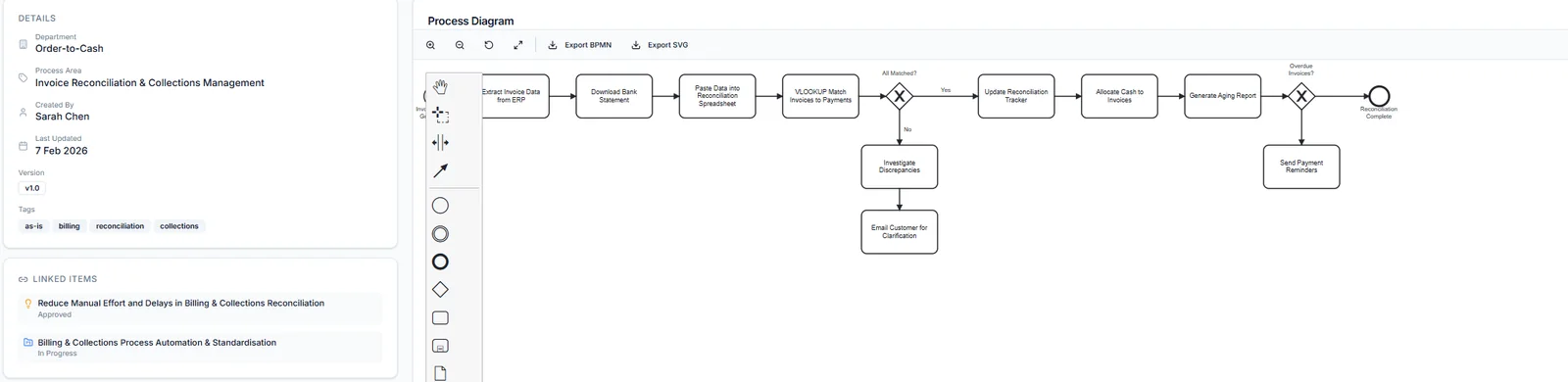
Process mapping: BPMN 2.0 maps in minutes — from a whiteboard photo or a paragraph of text.
- Draw and edit maps in a full BPMN 2.0 editor
- Publish, duplicate and link maps to the ideas and projects they relate to
- Link sub-processes in a map straight to your process taxonomy
- Turns a photo of sticky notes or a whiteboard into a clean BPMN map
- Turns a written description of a process into a BPMN map
- Finds bottlenecks, TIMWOOD waste, automation opportunities and compliance gaps in any map
Process taxonomy: Your process taxonomy, alive — every artefact linked to where it belongs.
- Build a five-level hierarchy: Enterprise → Value Stream → End-to-End → Sub-Process → Task
- Give each process an owner, status, type, criticality, risk rating and automation potential
- Link any idea, project, map, capture or SOP to any level, and roll performance up the tree
- Analyses each process for waste, automation opportunities and variability
- Raises risk flags and improvement suggestions for each process
- Puts its suggestions next to the CI activity already linked, so work is not duplicated
Process capture: Do the task once on screen. Get the process map.
- Screen-record the process in any app on your screen
- Steps are captured automatically when the screen changes — or mark them yourself
- Pause and resume at any time; each recording feeds timing data to the process
- Looks at every captured screenshot and writes what happened in that step
- Converts the recording into a BPMN process map in one click
- Builds real cycle-time data so performance is measured, not guessed
SOPs: SOPs that write themselves — from what people actually do.
- Pick a capture and generate the SOP
- Review and edit it on screen before anyone sees it
- Download it as a Word document, ready for your document control
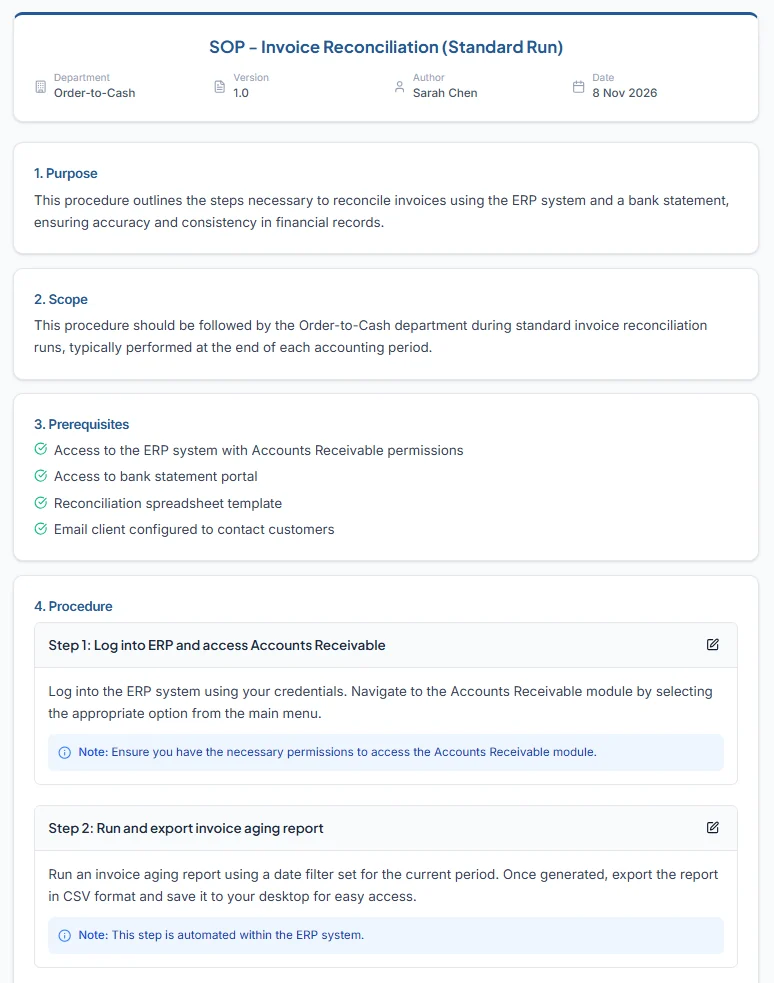
- Writes the purpose, scope and prerequisites
- Writes step-by-step instructions with the screenshot for each step
- Links the SOP to the process it documents, so it is found from your taxonomy
AI for CI
Your team improves. AI does the rest.
Not a chatbot bolted on the side. AI is built into each step of the improvement cycle, doing the categorising, drawing, describing, writing and analysing that eats a CI practitioner’s week.
Categorises every idea
Quick Win, Tech Project or DMAIC, with impact and effort scores and a reason.
Answers questions about your pipeline
Ask which ideas save most, what is stuck in review, or where the value is.
Reads project risk
Looks across tasks, RAID items and progress, and says what to do next.
Maps from a photo
Sticky notes from a workshop become an editable BPMN 2.0 map.
Maps from a description
Type how the process runs; get a clean map back.
Finds waste and bottlenecks
Bottlenecks, TIMWOOD waste, automation opportunities, compliance gaps and quick wins, ranked by impact.
Describes every captured step
Vision AI reads each screenshot and writes what the user did.
Writes the SOP
Purpose, scope, prerequisites and illustrated steps, exported to Word.
Briefs leadership
Executive insights on benefits realised, risks and the quick wins to back.
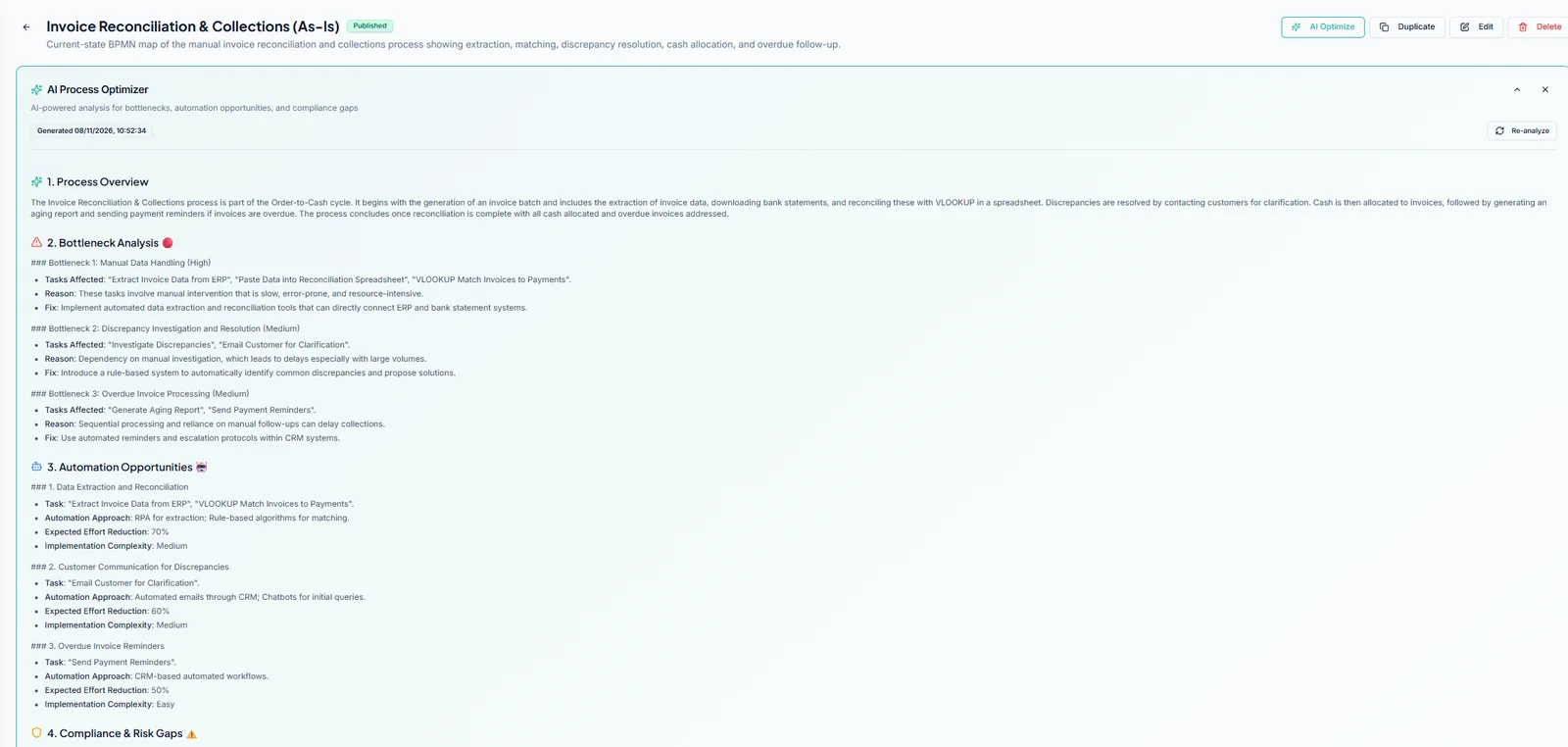
AI suggests; your people decide. Ideas still go through your approvers, maps and SOPs are reviewed and edited before they are published.
Process capture
Two days of documentation, done in 20 minutes.
Shadowing people, scribbling notes, drawing the map, then writing the SOP — that is days of work per process. In Beyond Delta it is one recording. And because every capture is timed and linked to your taxonomy, you also get real performance data for the process.
- 01
Record it once
Share the screen, window or tab and do the task as normal. Steps are grabbed when the screen changes, or when you mark them.
- 02
AI describes each step
Vision AI reads every screenshot and writes what happened, so nobody types up notes afterwards.
- 03
Get the process map
Convert the recording into a BPMN 2.0 map with one click, ready to analyse and improve.
- 04
Get the SOP
Generate an illustrated SOP from the same capture and download it as a Word document.
Benefits realisation
Make sure every project hits its target — and prove it.
Most CI programmes count projects closed. Beyond Delta tracks what they delivered. Every project carries its baseline, the expected improvement and the realised result, so you see which initiatives are beating target, which are at risk, and how much value is still on the table.
Baseline
Where the process is today
Expected
The improvement the project committed to
Realised
What it actually delivered, measured
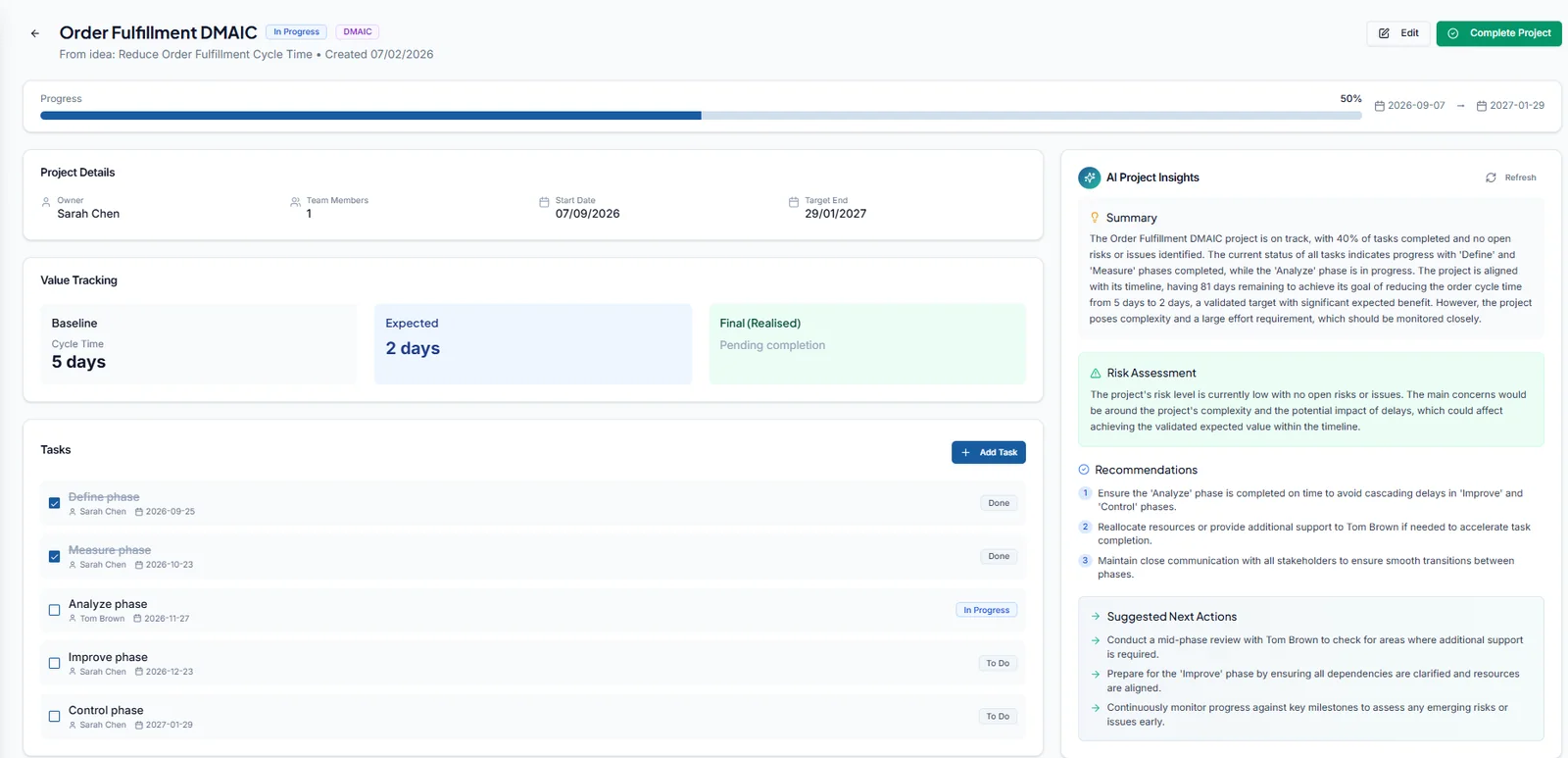
Catch slipping benefits before they slip.
- Value tracking on every project: baseline, expected and realised, against the metric it was meant to move
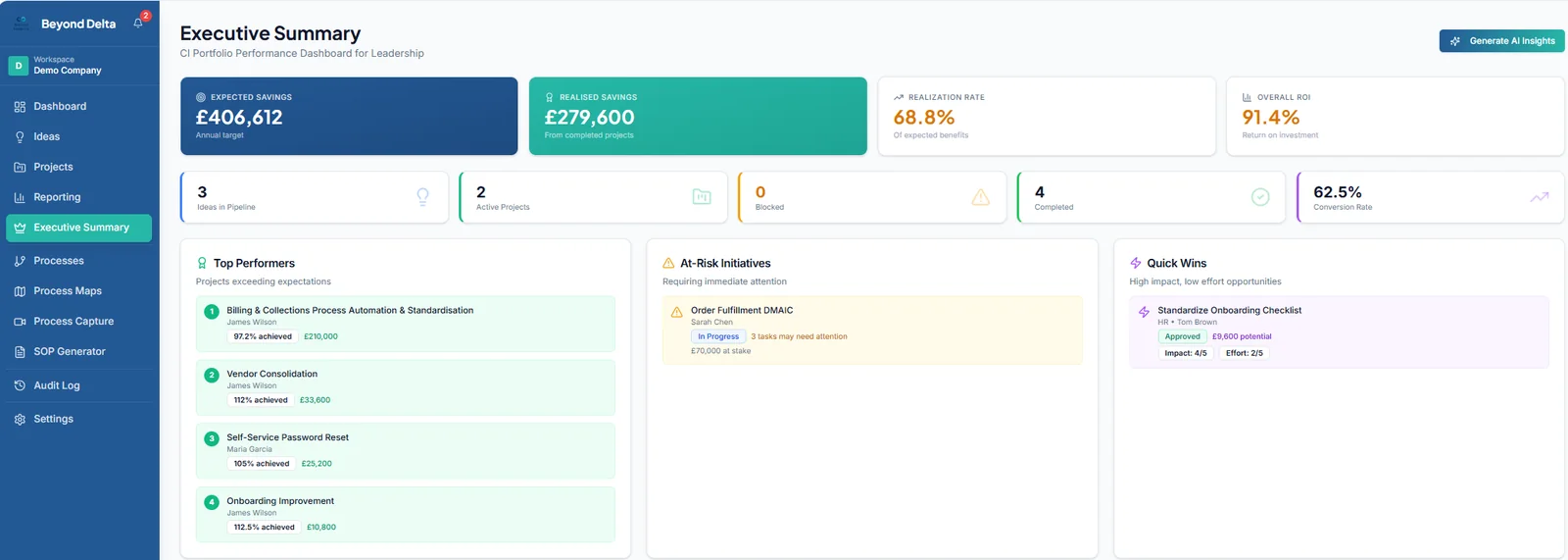
- Portfolio realisation rate and ROI, live, from expected and realised savings
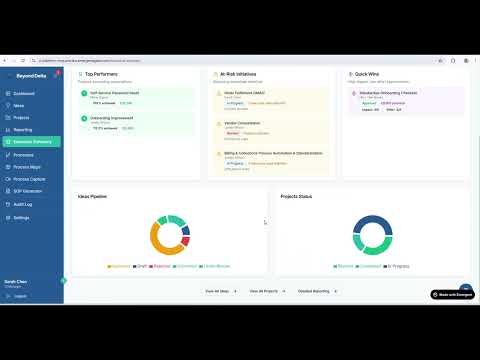
- Top performers beating target, and at-risk initiatives with the money at stake
- AI project insights: health summary, risk assessment, recommendations and next actions
- Executive summary with AI-written insights for leadership
- Idea rankings, ROI analysis and process performance from timed captures
- Export ideas and projects to CSV for your own analysis
Governance built in
Structured enough for a CI board. Simple enough that people actually submit ideas.
Roles that match CI
Submitter, Approver and CI Manager, each seeing and doing the right things.
Your own workspace
Each organisation gets its own separate, permission-controlled workspace.
Full audit log
Every change recorded and filterable. Processes with history are retired, not deleted.
Import and export
Bring ideas in from Excel or CSV; export ideas and projects to CSV.
Comments and files
Discussion and attachments on ideas and projects, where the work is.
Built-in AI help
An assistant that knows the platform answers “how do I…” questions in the app.
Read how we host and protect data on our security page.
Built by a CI practitioner, not a software company guessing at Lean.
Beyond Delta was designed by a Lean Six Sigma Black Belt with over 18 years in finance transformation and operational excellence. The idea types, the approval stages, the RAID log, TIMWOOD waste analysis and the five-level process hierarchy are there because that is how real improvement programmes run.
See it in action
AI transforming continuous improvement, end to end.
Questions CI leaders ask us
AI does the jobs that slow CI teams down: categorising and scoring ideas, drawing process maps from photos and descriptions, describing each step of a screen recording, writing SOPs, analysing maps and processes for waste and bottlenecks, and briefing leadership. Your team stays in control: AI suggests, people approve.
It is your organisation’s process hierarchy in five levels, from the whole enterprise down to individual tasks. Every idea, project, map, recording and SOP links to a level in it, so you can open any process and see everything that has ever touched it — and roll performance up from task to value stream.
You choose exactly which screen, window or browser tab to share, and you can pause at any point. Beyond Delta takes a screenshot when the screen changes (or when you mark a step), and AI writes a description of each one. Screenshots are sent to an AI vision model for that description, so avoid recording screens showing data you would not want processed.
No. Ideas can be imported from Excel or CSV. Existing maps can be rebuilt quickly by photographing them or describing them and letting AI draw the BPMN version, which you then edit.
Yes. SOPs download as Word documents. Ideas and projects export to CSV.
Every idea and project records a baseline, the expected improvement and the realised result against the metric it targets, plus expected and realised savings. The Executive Summary rolls this up into a realisation rate and ROI, shows which projects are beating target and which are at risk, and AI project insights flag problems and next actions before the benefit slips.
No. It works for a single improvement lead running a backlog as well as a programme across many teams. You start with what you need — often ideas and projects — and switch on mapping, capture and SOPs as you go.
It depends on how much you want to configure and bring across. We will agree a plan on a short call, set up your workspace and process hierarchy with you, and get your team using it.
Stop documenting improvement. Start delivering it.
See Beyond Delta set up around your own processes in a live demo. Bring a process you are tired of documenting — we will show you what AI does with it.
AI for CI, from Beyond Measure